Showing posts with label Project Server 2010. Show all posts

Implementing Program Support in Project Server 2010 - Part 2

In this post, I will cover how the Program  support can be enabled using another product from FluentPro products portfolio - FluentPro Autocomplete Manager.

Autocomplete manager allows to enable auto complete feature to project level custom text field and get the data from 3 data sources:
- SQL Server Query
- SharePoint List
- Project Server Security Group

So, let's start.

I assume that Autocomplete Manager is installed and licensed.

1. Create 3 fields:

  • Portfolio Name - project level, Text, Single line
  • Program Name - project level, Text, Single line
  • IsProgram - project level, Flag


2. Add these 3 fields to Project Information PDP


3. Create 2 projects, Program A, Program B and "check" IsProgram field.


4. Create new SharePoint List in PWA and call it Corporate Portfolio. Add 3 items - Portfolio A, Portfolio B, Portfolio C


5. Got to Server Settings -> Project Detail Pages and open Project Information PDP for edit.
next to Program name and Portfolio Name fields you will see icon - that's icon for Autocomplete Manager settings for that field.


6. Click on first icon (next to Program Name). We want to configure this field to pick values from Reporting Database for this PWA so we can build a list of projects that are "programs" (have IsProgram = 1). Fill the data as shown here (please note that you might need to provide credentials / get access to DB. Talk to your DB Admin):


You can test both connection string and SQL Query for errors in run time by clicking on Test buttons.

7. Let's configure Portfolio Name field to get data from SharePoint List we created:


8. We should be all set. Let's save changes to PDP, go to Project Center and create new project.
Start typing in Program Name field - Autocomplete Manager will provide all options that match:


Start typing in Portfolio Name field - Autocomplete Manager will provide all options that match:


That's it. In case of using Autocomplete Manager, your system is very dynamic, no server side jobs needed. Very easy to use.

Summary:
Both approaches have cons and pros. If you prefer to use Lookup Tables - then you can use Lookup Manager. If you are fine with content from data source directly and good to go with values in text fields only - Autocomplete Manager provides the most easiest way .


Note 1: We covered using Autocomplete Manager for SharePoint Lists and SQL Server. In Addition, it allows to use it as "People Picker" picking data from Project Server User Groups.

Note 2: Versions of Lookup Manager 2013 and Autocomplete Manager 2013  for Project Server 2013 are expected around mid-February.


Let us know if you have any questions - we would be happy to answer all of them.

Implementing Program Support in Project Server 2010

Many organizations that have a more than average number of projects, usually are grouping projects into programs and portfolios. In this post and next one I will describe the best ways how to enable support of "Programs" in Project Server 2010 and how our products can help.

Out-of-the-box solution - Master Projects / Sub Projects

In Project Server by default there is no concept of "Program", but project sever supports the so called "master project" / "subproject" functionality. That means, that users can insert projects into one project (usually a "container" project) and that project can become master project and a "program".

This approach has multiple advantages and disadvantages (you can see everything in one place but the same time there are multiple challenges with edit / read-only, it is very hard to deal with projects that contain tens of subprojects).

Several blog posts:


You can search in Google /Bing for more information using the keywords "master project subproject project server 2010" and will find additional information.

Custom solution - Using Custom Fields

Another approach is to create one field with lookup table - Program Name and use it as selection / dropdown for selecting programs from that dropdown.

There is one big disadvantage of this approach - user needs to support content of that lookup table manually, but with small number of programs this works better and is a more "cleaner" solution.

FluentPro has 2 products that can help with this :


In this post, we will create overview for implementing this approach with help of one of our products - Lookup Manager, product that allows sync of custom lookup table with data from SharePoint list or any database.

We will create 1 lookup table and 2 fields:

Lookup table:

      Program

Fields:

  • IsProgram (Flag, project level)
  • Program (Text, project level, referencing Program lookup table).

we will add both fields (IsProgram and Program) to Project Information PDP.

As next step, we will configure installed Lookup Manager to read data from Reporting Database. We want to select all project names that are programs (have IsProgram set to 1 (Yes)) and add them to than lookup table.

1. Go to Site Actions -> View All site Content and click on the list"FluentPro Lookup Manager".

2. Go to Items -> New item -> SQL Data Source. That will open window where you need to define a sync rule.


3. Enter all information and press Save button. This will create a SharePoint job, and you can adjust schedule to work as you want.  Please use information from your project server configuration (server name, database name):


4. For this scenario, we will set it to work every 5 minutes - it means, system will query database every 5 minutes and if required will try to update lookup table with values.
- Go to Central Administration -> Monitoring -> Timer Jobs -> Review Timer Job Definitions.

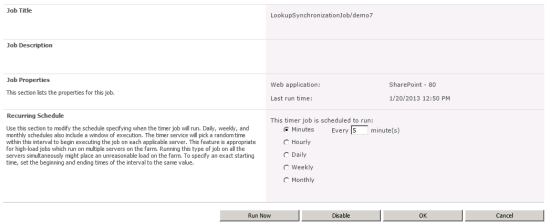
- Find job with name: LookupSynchronizationJob/<pwaname>  and click on it
- Change schedule and click OK.


5. Let's create 2 projects that are programs: Program A and Program B (do not forget to set IsProgram field).

6. Wait for 5 minutes and start creation of new projects - and check values in dropdown for Program field:


That's it. If you do not create programs very often, you can set the job to run once a day or on any desired schedule.

Few more features of FluentPro Lookup Manager:

- Data can be synchronized from SQL Server as well as SharePoint data sources.
- We support multi-level lookup tables (data in source should use the separator for each element: Level1.Level2.Level3) Any number of hierarchy levels is supported and separator is configurable.
- Lookup Manager is not deleting elements, only adding new ones

In next post, we will describe how to implement support of programs using Autocomplete Manager.

Looking for several companies / consultants to test FluentPro Project Migrator - bulk MPP migration software for Project Server 2010

We've completed development cycle and are very close to complete internal testing cycle for FluentPro Project Migrator software that allows to migrate projects (MPP files) from other EPM systems (Attask, Daptiv, EPM Live - any system that can save to MPP) and from any Project Server 2010 PWA instance (in case of PWA - we support project-level and task-level metadata migration as well) into Project Server 2010 PWA.

We are looking for 5 to 10 companies to be a first beta-testing users. In return for the participation in test and feedback, you will receive one license at no cost right after public release (March 2012 at Microsoft Project Conference 2012 ).

Product is implemented as add-in for Project Professional 2010.

Please send your contacts to beta (at) fluentpro.com with potential problem / task that you have and after review we will send you copy of software installation package and links to several video on how to use the software.

We plan to distribute version on March 1, 2012. There will be 2 versions - Lite with some limitations and Pro without any limitations. Product will be distributed independently and as part of FluentBooks Pro package.

Preview video is available here:

Getting Started with Project Server 2010 - Part 1 - Post Installation Steps

This video demonstrates some recommended post-installation activities to start the use of Microsoft Project Server 2010:

  • Configuration of Enterprise Calendar
  • Custom Fields
  • Notifications
  • Security for Project Delete
  • Time tracking configurations and Time Periods
  • Configuration of Administrative Backup.


Part 2: http://www.projectserverblog.com/2012/01/getting-started-with-project-server_15.html

Note: You might want to install the free edition of our Project Server 2010 Configuration Audit Software - FluentPro Audit Lite. It is absolutely free to use and easy to install.

2 more product videos available - FluentPro Publisher and FluentPro View Manager for Project Server 2010

Today, we've prepared 2 more videos for our products:


  • FluentPro Project Publisher - software that allows to re-save and re-publish all or selected projects

  • FluentPro View Manager - this is an update (v.2.0) of our existing product that allows to customize Project Server 2010 and link views to EPT and user security group membership and define default views to load. 


FluentPro Project Publisher


FluentPro View Manager


Enjoy - and we would be happy to hear your feedback!

Project Server 2010 - One or multiple PWA instances?

Project Server 2010 - One or multiple PWA instances?
In our Project Server 2010 practice we work with various customers and see their deployment strategies, problems and great things. Today, I wanted to cover one of the major issues that big companies without centralized PMO are facing.

The problem (challenge) is - Should organizations create one PWA for entire organization or several PWA per business unit or department?

Our recommendation is ONE PWA.

One of our customers had 2 departments that started implementing project server about the same time but independently. Now - the challenge is to merge the data. 150 projects total, project sites, duplicated custom fields and names, different document library structure. It is a significant effort that is way more complex now than to have several joint meetings to discuss the approach, attributes and structure.

If fact, this was driven by requirements to isolate data between departments and this is a task for Project Server 2010 consultant / consulting company or qualified Project Server 2010 Administrator to configure security in a way that it will isolate data.

Analysis of pros and const for one PWA:

Pros:

  • Executives can see all the information in one place.
  • In future, departments that will start using PS (for example HR) will re-use existing approaches, practices. This significantly reduce time and investments required to start using Project Server
  • Ability to overview entire resource pool in the organization and do cross-departmental resource planning
  • Ability to do the cross-departmental dependencies in projects.
Cons:
  • Slightly more complicated security configuration
  • Anything else?

I would recommend using additional PWA for test / staging environments if there is no additional hardware available (recommendation is still to have staging / development environments as separate farms).

Feel free to comment or ask questions - I will be happy to answer.

Related blog posts:

Distribute templates to multiple PWA: http://www.projectserverblog.com/2012/02/distributing-project-templates-in.html

Merge PWAs with help of FluentBooks: http://www.projectserverblog.com/2011/12/merge-2-project-server-2010-pwa-with.html

Blank Installation of Project Server 2010 with SP1 - Excel Services not working

Blank Installation of Project Server 2010 with SP1 - Excel Services not working
Today faced problem described in several other blogs about problem with Excel Services not working when you upgrade Project Server 2010 to SP1 (exisiting or new).

The reason for the error is if there is no root site collection in "yourdomain/" (that was my case, I created just PWA) Excel services in not working and giving the JavaScript error starting with  "http://<your_domain>/_layouts/EwaStringsHandler.ashx/en-US?......."

To resolve - go to Central Administration and create blank site collection at the root of your SharePoint Server and refresh the excel report - it will start working immediately.

Project Server 2010 SP1 is available for download.

Project Server 2010 SP1 is available for download.
Microsoft just released Project Server 2010 SP1.
MS also recommends to install the June CU after SP1 since it has number of fixes.

Please read carefully all instructions and test your applications in test environment before installing it to production servers. 


Few advises to customers installing Project Server 2010 in-house with internal IT

Few advises to customers installing Project Server 2010 in-house with internal IT
Quite often we handle situations when customer's IT department is installing Project Server 2010 internally using their general IT specialists. From time to time this leads to errors that hardly discovered but easy to fix.

One organization simply deleted farm admin from local admins group on servers in farm - it is unsecure from their point of view (disregarding that MS clearly states that this has to be done). As you can imagine you cannot make any change since you get access denied and other errors.

Another organization is not caring about configuring administrative backup daily schedule and resulting in loosing data because of change.

other organizations install Reporting services in DB server and insist that this is the way it has to be and it is our problem how to configure this.

Customers - if you install project server - PLEASE follow the guide from Microsoft and please do not change any configuration / setting after that. IF you have a chance - order an audit / assessment of configuration by one of the partners and follow their recommendations.

Troubleshooting Project Server 2010

Troubleshooting Project Server 2010
This week was kind of crazy - 2 clients with major problems. Both on RTM, DB + APP + WFE.

One of the client got the PWA in test environment corrupted. SharePoint pages inside PWA work fine but not all PS related pages and the problem is that ULS is not giving exact picture what's going on.
tried re-provisioning, deleting PWA and re-provisioning with same DBs into the same name. Ended up with restoring from day-before crash and installing Feb CU. Went well, but we've lost like 2 days and thanks that it was just a test environment.

Second client is also on RTM. But in test environment the Search application was corrupted somehow and when someone tried to delete DBs were gone but service left and it is still impossible to delete it from either   Central administration and PowerShell.

Hoped that CU will fix but on step 9 in SharePoint configuration wizard gives the error on that service since cannot do anything with it.

Will try delete it from Config DB and see if it will be gone and will tyr re-run configuration wizard. If not successful - will have to re-build the entire test environment.

Also, fixed few problems -  CLR was not enabled in DB and Taxonomy picker has the #&44; instead of ",". Small one but logs have errors and it looks ugly.

Found a strange error - SP was giving error that farm admin cannot run reconfigure on master DB and he has server wide role sysadmin. After giving explicit permissions to DB this was fixed.

This was a fun week in Houston, TX - interesting tasks, good people good food and excellent outdoor swimming pool :-)

Also, I'm almost done with content for FluentPro.com website - we go live next weekend!.

Just passed 070-177 exam

Just passed 070-177 exam
Discovered some gaps in my knowledge (migration from 2003 and 2007). Some questions are stupid, made not for knowledge, but for reading the questions.

Merging 2 instances of Project Server 2010 into one instance

Merging 2 instances of Project Server 2010 into one instance
Right now I am working on merging of 2 instances of Project Server 2010 into single one.
2 departments started PS2010 trials independently; were running it for about 6 month and performed number of customizations:
  • customer fields (project and task level). Some fields have matching name and different meaning / values and some fields have different name but same purpose
  • different EPTs
  • different Project Site templates (that's the most easiest problem to solve)
  • one is using Single Entry, second one is using Free Form for progress reporting and no time sheets.
Beside custom fields, the biggest challenge is that both instances have over 50 projects that are actively being used and so far it looks that this will be the most time consuming operation.

Proposed strategy is to pick one instance that is more "clean" and less "messy" and have it as "master" instance and merge another instance into this one.

So approach will look like:
  1. Backup instances
  2. Pick one instance as master (I1).
  3. Export project site template from I2
  4. Import site template into I1
  5. Unify custom fields
  6. Try applying Playbook from I1 and then from I2 into 3rd instance to see the conflicts, rename fields /lookups in I2 if required. If not working out - move it manually
  7. Export project from I2 as will be described below
  8. Import projects as described above
  9. Have PMs to edit new projects to have same project ECF values as in old system (This can be automated with FluentPro's ECF Migrator tool)
  10. Copy resource pool from I2 via Project Pro into I1
  11. Import resources
  12. Replace resources in project 
  13. export project sites from I2 with STS-ADM
  14. import project sites into I2
  15. Point projects into new sites
  16. Verify everything :-)

The easiest workaround for moving projects between instances is to save all task level custom fields into standard local column (Text1..., Number1...) using Copy-Paste of columns, save a local copy, upload to destination server and copy values back to Enterprise custom fields.

I will update this post if will find one missing steps.

Update: We've developed a product - FluentBooks that allows configuration migration, merge and documenting. You can learn more here or watch a sample video in another our blogpost.

Reviewing Project Server 2010 Implementation

Reviewing Project Server 2010 Implementation
Today was on a call with company that had implementation of PS by quite big EPM partner. This was ugly.
  • To display milestones on Project workspace they put schedule control.
  • On Status Report page instead of displaying information they have a mix - data entry and some display.
  • Status Report is not printable and like 1500 pixels wide
  • To create a page to display risks and issues from all projects they read from number of sites but display just name.
  • In custom fields there are like 30 extra fields that never were used - looks left from 3rd party solution.
It was really bad; Partner simply stepped out after a while not completing solution but getting paid. Nice.

Project Server 2010 Solution Starters - feedback from customers

Project Server 2010 Solution Starters - feedback from customers
After being involved in Project Server 2010 Solution Starters development, we are always pleased to see that companies who are implementing / using Project Server 2010 utilize some of the solution starters. From our experience, most popular ones are Dynamic Workflow, Bulk Edit and Bulk Import.
Here I wanted to share some ideas / problems from customers who are using them.

Dynamic workflow
  • ability to send email when moving between stages

Bulk Edit
  • Works slow on big number of projects (over 50) (we have customizations with reading data from RDB but writing via PSI)
  • Some customers want projects to be checked-in after editing
  • Correct handling of session end (we heard one comment from user on this and it is more our guess

Bulk Import
  • using custom fields with lookup tables and populating values.
Maybe community should ask MS to implement some of those changes?

Transfer of Values between custom fields

Transfer of Values between custom fields
Working on number of Project Server 2007 to 2010 upgrades, out team faced number of issues with clearing metadata, especially custom fields. We also met these issue few times doing customizations / audits of Project Server 2010 implementations.

Typical problem is that some fields at customer's systems were using custom lookup tables with custom values - for example Yes, No, TDB (or different set of values); Then customer decides to move to Flag type for this field; or customer was using description field for capturing project summary but then decides to move to special field.

It sounds quite easy - delete fields and create ones; But if you have over 1000 projects, that becomes quite complicated, since efforts to update / transfer those fields manually is quite big.

Second option - go to DB (published) and do SQL update ( Strongly not recommended by Microsoft).

3rd option - create tool and do it via PSI.

So, we've developed a tool that allows conditional transfer / conversion of fields using PSI. It is not fast (it takes about 5 to 300 seconds) for full cycle depending on project size / farm or single WFE / event handlers, but you usually run tool just once.

Case: Field Enterprise project type has values - Enterprise Project, Non - Enterprise, TBD. Field is not required, no default value. Idea is to create new field Enterprise Project - Flag, rename old field, update all projects and set:
1. if Value = Enterprise Project, set Value = 1
2. if Value =TBD, Non-Enterprise or Empty Set Value = 0.
3. Save and publish project.

Tool is developed as WinForms application that allows to define number of such rules applied for the project. Tool iterates all projects (can specify Draft or Published only or all) and applies rules, saves and publish projects, so all data become visible.

Side effect - sometimes projects that sit in Draft for months become published :-)

Tool is available for purchase.