
Many organizations that have a more than average number of projects, usually are grouping projects into programs and portfolios. In this post and next one I will describe the best ways how to enable support of "Programs" in Project Server 2010 and how our products can help.
Out-of-the-box solution - Master Projects / Sub Projects
In Project Server by default there is no concept of "Program", but project sever supports the so called "master project" / "subproject" functionality. That means, that users can insert projects into one project (usually a "container" project) and that project can become master project and a "program".
This approach has multiple advantages and disadvantages (you can see everything in one place but the same time there are multiple challenges with edit / read-only, it is very hard to deal with projects that contain tens of subprojects).
Several blog posts:
You can search in Google /Bing for more information using the keywords "master project subproject project server 2010" and will find additional information.
Custom solution - Using Custom Fields
Another approach is to create one field with lookup table - Program Name and use it as selection / dropdown for selecting programs from that dropdown.
There is one big disadvantage of this approach - user needs to support content of that lookup table manually, but with small number of programs this works better and is a more "cleaner" solution.
FluentPro has 2 products that can help with this :
In this post, we will create overview for implementing this approach with help of one of our products - Lookup Manager, product that allows sync of custom lookup table with data from SharePoint list or any database.
We will create 1 lookup table and 2 fields:
Lookup table:
Program
Fields:
we will add both fields (IsProgram and Program) to Project Information PDP.
As next step, we will configure installed Lookup Manager to read data from Reporting Database. We want to select all project names that are programs (have IsProgram set to 1 (Yes)) and add them to than lookup table.
1. Go to Site Actions -> View All site Content and click on the list"FluentPro Lookup Manager".
2. Go to Items -> New item -> SQL Data Source. That will open window where you need to define a sync rule.

3. Enter all information and press Save button. This will create a SharePoint job, and you can adjust schedule to work as you want. Please use information from your project server configuration (server name, database name):

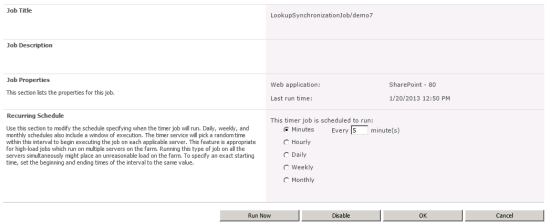
4. For this scenario, we will set it to work every 5 minutes - it means, system will query database every 5 minutes and if required will try to update lookup table with values.
- Go to Central Administration -> Monitoring -> Timer Jobs -> Review Timer Job Definitions.

- Find job with name: LookupSynchronizationJob/<pwaname> and click on it
- Change schedule and click OK.
5. Let's create 2 projects that are programs: Program A and Program B (do not forget to set IsProgram field).

6. Wait for 5 minutes and start creation of new projects - and check values in dropdown for Program field:

That's it. If you do not create programs very often, you can set the job to run once a day or on any desired schedule.
Few more features of FluentPro Lookup Manager:
- Data can be synchronized from SQL Server as well as SharePoint data sources.
- We support multi-level lookup tables (data in source should use the separator for each element: Level1.Level2.Level3) Any number of hierarchy levels is supported and separator is configurable.
- Lookup Manager is not deleting elements, only adding new ones
In next post, we will describe how to implement support of programs using Autocomplete Manager.
Out-of-the-box solution - Master Projects / Sub Projects
In Project Server by default there is no concept of "Program", but project sever supports the so called "master project" / "subproject" functionality. That means, that users can insert projects into one project (usually a "container" project) and that project can become master project and a "program".
This approach has multiple advantages and disadvantages (you can see everything in one place but the same time there are multiple challenges with edit / read-only, it is very hard to deal with projects that contain tens of subprojects).
Several blog posts:
- http://av-epm.blogspot.com/2011/09/project-server-2010-master-and.html
- http://av-epm.blogspot.com/2011/09/managing-master-and-sub-projects.html
- http://www.projectserverblog.com/2012/02/project-server-2010-working-with-master.html
You can search in Google /Bing for more information using the keywords "master project subproject project server 2010" and will find additional information.
Custom solution - Using Custom Fields
Another approach is to create one field with lookup table - Program Name and use it as selection / dropdown for selecting programs from that dropdown.
There is one big disadvantage of this approach - user needs to support content of that lookup table manually, but with small number of programs this works better and is a more "cleaner" solution.
FluentPro has 2 products that can help with this :
In this post, we will create overview for implementing this approach with help of one of our products - Lookup Manager, product that allows sync of custom lookup table with data from SharePoint list or any database.
We will create 1 lookup table and 2 fields:
Lookup table:
Program
Fields:
- IsProgram (Flag, project level)
- Program (Text, project level, referencing Program lookup table).
we will add both fields (IsProgram and Program) to Project Information PDP.
As next step, we will configure installed Lookup Manager to read data from Reporting Database. We want to select all project names that are programs (have IsProgram set to 1 (Yes)) and add them to than lookup table.
1. Go to Site Actions -> View All site Content and click on the list"FluentPro Lookup Manager".
2. Go to Items -> New item -> SQL Data Source. That will open window where you need to define a sync rule.
3. Enter all information and press Save button. This will create a SharePoint job, and you can adjust schedule to work as you want. Please use information from your project server configuration (server name, database name):
4. For this scenario, we will set it to work every 5 minutes - it means, system will query database every 5 minutes and if required will try to update lookup table with values.
- Go to Central Administration -> Monitoring -> Timer Jobs -> Review Timer Job Definitions.

- Find job with name: LookupSynchronizationJob/<pwaname> and click on it
- Change schedule and click OK.
5. Let's create 2 projects that are programs: Program A and Program B (do not forget to set IsProgram field).
6. Wait for 5 minutes and start creation of new projects - and check values in dropdown for Program field:
That's it. If you do not create programs very often, you can set the job to run once a day or on any desired schedule.
Few more features of FluentPro Lookup Manager:
- Data can be synchronized from SQL Server as well as SharePoint data sources.
- We support multi-level lookup tables (data in source should use the separator for each element: Level1.Level2.Level3) Any number of hierarchy levels is supported and separator is configurable.
- Lookup Manager is not deleting elements, only adding new ones
In next post, we will describe how to implement support of programs using Autocomplete Manager.