Showing posts with label Project Server 2013. Show all posts

Navigation between PWA and Project Site in Project Online / Project Server 2013

I wanted to review navigation between PWA and project details for sharepoint task list projects in Project Online.
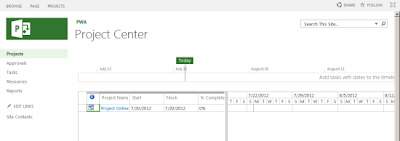


When originally user clicks on Project in Project Center, user get to project details.
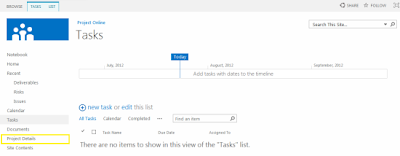


There is no link to Projects (Project Center) but there are 2 possible ways how to get there:
1. Click "back" in browser (if you just landed on it)
2. Click on Project Detail (highlighted on screenshot):
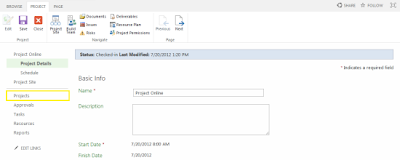

That will refresh screen and navigation and you will see the link to "Projects" available (highlighted).

For Enterprise Projects everything works just fine:
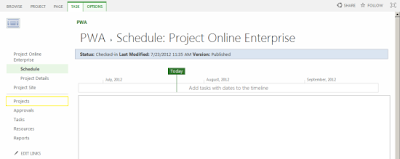


If you know faster way - please let me know. Thanks!

Excel Services - Project Online / Project Server 2013

We were playing with Excel Services to see how we can build reports and publish them to the web - same way as we did in 2010. Unfortunately it looks it is not possible now - and it seems this is a limitation of Project Online Preview.

So.
1. There is a step-by-step instruction how to do that - http://officepreview.microsoft.com/en-us/project-server-help/use-excel-2013-to-create-a-new-project-web-app-report-HA102923779.aspx?CTT=5&origin=HA102923896

2. When report is created and saved, you can open it in PWA. It opens absolutely fine - but it displays information that WAS already in Excel. 


It is kind of STATIC and in fact it will be outdated. When you try to get data connections refreshed - you get error that external data connection cannot be refreshed:


3. To refresh data, you need to edit it again in Excel 2013 by clicking on Edit Workbook and selecting Edit in Excel - go to DATA Tab and click on Refresh All.


Data will be refreshed, you can save it back to PWA.
I hope that at time of RTM, excel services reports in Project Online will be able to update data dynamically.

Small update:
There is article on TechNet about reporting: http://technet.microsoft.com/en-us/library/ff603998(v=office.15)


"In Project Online, Project Web App data for reporting is only available through the OData feed. The OData feed must be accessed through Excel 2013 Preview. OData reports can be published to the Business Intelligence Center and displayed using Excel Services, but the data cannot be refreshed using Excel Services"


Enjoy!

Accessing Project Sites in Project Online / Project Server 2013

There are few changes that are related how users access Project Sites in Project 2013 compared to Project Server 2010.

Before, in Project Center on a ribbon there was a button - Project Site. User was able by selecting a line in a list of project click on it and you will get the new window with project site open.


In Project Online this button is gone from ribbon from Project Center.


But - you still can access the Project Sites - and I would say that this was made even easier.

When you click on Project name, you get to the screen with all project related information and there are 2 ways to access the associated Project Site:


First one is button on Ribbon and second one is link  "Project Site" on the left side of navigation menu.

Enjoy!